
We independently review every app we recommend in our best apps lists. When you click some of the links on this page, we may earn a commission. Learn more.
Scheduling a meeting is no biggie, right? You just have to trade a dozen emails while squinting at your calendar in a negotiating mode that’d make the UN jealous, all to end alone in a Zoom room, realizing that your invitee is actually now sleeping on the other side of the earth. And then the slot-picking gymnastics begin again.
Meeting scheduler apps get rid of this back-and-forth, place the events in open slots in your calendar, and follow up with everyone with the conferencing links. Set it up once, share it with your invitees, and let them book time with you with four or five taps, tops.
There are all sorts of meeting scheduler tools out there covering all kinds of use cases. I’ve used a few of them over the years, and after diving into every single one for writing this list for you, I think I’m going to switch again. So whether you’re here to grab your first one or looking to leave Calendly or Doodle behind, here are the best meeting schedulers.
The best meeting schedulers
-
Calendly for end-to-end meeting management
-
Calendar for appointments in a calendar app
-
SavvyCal for mixing polling with a standard scheduling tool
-
zcal for a free meeting scheduler
-
Reclaim for priority-based scheduling
-
Cal.com for follow-up automation with AI phone calls
-
Zeeg for a customizable link-in-bio page
What makes the best meeting scheduler?
How we evaluate and test apps
Our best apps roundups are written by humans who’ve spent much of their careers using, testing, and writing about software. Unless explicitly stated, we spend dozens of hours researching and testing apps, using each app as it’s intended to be used and evaluating it against the criteria we set for the category. We’re never paid for placement in our articles from any app or for links to any site—we value the trust readers put in us to offer authentic evaluations of the categories and apps we review. For more details on our process, read the full rundown of how we select apps to feature on the Zapier blog.
Meeting scheduling apps are in a race to reduce obstacles and friction, helping people book time with each other without the frustration. This means appealing user interfaces that are easier to read, fewer clicks from start to finish, and team features to smooth out internal coordination.
Here’s what I specifically looked for when selecting the best meeting schedulers:
-
Ease of use. The meeting scheduler has to be user-friendly for both you as a booking page creator and your invitees.
-
External integrations. Beyond the core calendar and video conferencing, connecting your meeting scheduler app with your other apps can automate work related to your meetings. I kept an eye on those with a good list of integrations, as well as those that connect with Zapier.
-
Automatic video call setup. Creating a video conferencing link with one of the major platforms and delivering it to all participants is key to a smooth process when using a meeting scheduling app.
-
Reminders and follow-ups. Everyone is busy; nudging people to attend reduces no-shows. Follow-ups are great for nurturing and keeping the relationship growing. Having both in your meeting scheduler makes the experience easier and more hands-off for you.
-
Value for money. It’s a painful problem, sure, but not worth a $100/month commitment. Most of the meeting schedulers here have generous free plans; those that don’t compensate with extra features that help you with scheduling, team coordination, analytics, or extra automation.
To test the meeting schedulers, I signed up for each one of the apps below (as well as 40 more that didn’t make the cut), created a booking link, and integrated a video conferencing app. Then, I played around with the extra features until I was satisfied with the booking pages, automation, or calendar setup. Lastly, I booked meetings with myself to understand the invitee experience. I’m happy to report I have hours of meetings booked with myself and am receiving an endless stream of notifications for “1-on-1 with Miguel.”
Have a Zoom, Google, or Microsoft subscription?
If you already have a subscription with a major software suite or video conferencing solution, run a quick search to see if they’ve implemented their own meeting scheduling tool. It may turn out to have all the features you need without you having to sign up for yet another platform.
The best meeting schedulers at a glance
|
Best for |
Standout feature |
Pricing |
Website |
|
|---|---|---|---|---|
|
Calendly |
End-to-end meeting management |
Scheduling handled entirely by cc’ing Callie in email threads |
Free plan available; paid plans start at $10/month |
Visit Calendly |
|
Calendar |
Appointments in a calendar app |
Multiple workspaces |
From $16/month |
Visit Calendar |
|
SavvyCal |
Mixing polling with a standard scheduling tool |
Option for invitees to automatically overlay their calendars within the polling page |
Free plan available; paid plans start at $10/user/month |
Visit SavvyCal |
|
zcal |
A free option |
Generous free tier with customization |
Free plain available; paid plans start at $7/user/month |
Visit zcal |
|
Reclaim |
Priority-based scheduling |
Great analytics and team features |
Free plan available; paid plans start at $10/user/month |
Visit Reclaim |
|
Cal.com |
Maximum flexibility |
Open source |
Free for individuals; paid plans start at $16/user/month |
Visit Cal.com |
|
Zeeg |
A customizable link-in-bio page |
Straightforward user experience |
Free basic plan; paid plans start at $10/user/month |
Visit Zeeg |
Best meeting scheduler for end-to-end meeting management
Calendly (Web, iOS, Android)

Calendly pros:
-
AI features handle the full meeting lifecycle (scheduling, meeting prep, note-taking, and follow-ups)
-
MCP server available for connecting Calendly to ChatGPT or Claude
Calendly cons:
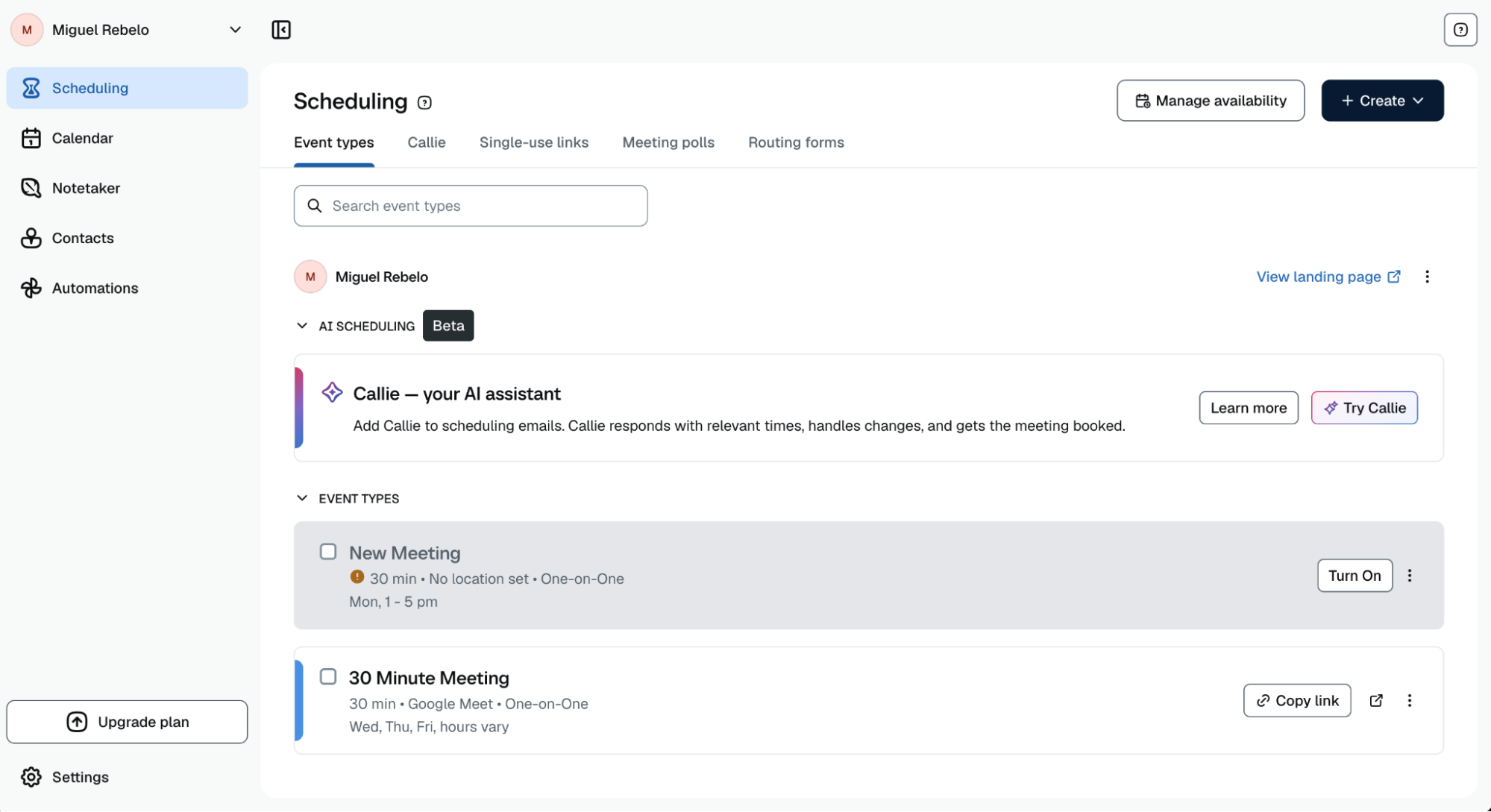
Make way for the category standard: I regularly meet with people who casually say, “Let me send you my Calendly so we can find a time next week.” It’s the best all-around option because it’s a trusted platform, the user experience is polished, and it packs advanced features if you need them. I’ve been using it for two years, and it has never failed me.
As you onboard, you can connect your calendar, no matter if it lives in Google, Outlook, or Microsoft Exchange. Create your first booking link by choosing the duration, location, and availability options, wrapping it up by connecting your video conferencing software of choice (or setting up a real-world location). You can add buffer time to wind-down and ramp-up for each meeting, as well as payment support with Stripe or PayPal. Comms around the meeting are automated, with Calendly delivering the meeting confirmation by default, and also offering email/SMS reminders and follow-ups once the meeting’s done.
Once the booking page is live, you can share it with your invitees. They can browse your availability and pick a time on an intuitive interface. Calendly is always linked to your calendar (without ever sharing what you’re doing), so it knows how to remove slots when you have events already planned or keep them available if you’re free. The emails include cancellation and rescheduling links, which clean up your calendar and keep everyone on the same page.
The free plan isn’t as amazing as others below (though freelancers and small business owners will be fine with it), but when you hop on the paid plan, you get a range of smart features that save even more time and streamline your meetings. The biggest examples: Callie, an AI assistant you cc on an email thread to find and propose meeting times, and then book the meeting for you—no link-sharing required. Notetaker, meanwhile, joins your Zoom, Google Meet, or Teams calls to automatically record, transcribe, and surface action items. Both are available on Standard Plus and Teams Plus plans.
By connecting Calendly to Zapier, you can orchestrate intelligent, end-to-end meeting workflows. For example, once Notetaker wraps up a call and surfaces action items, Zapier can automatically add those tasks to your project management tool, complete with assignees and due dates, and notify your team in Slack. Learn more about how to automate Calendly.
Zapier is the most connected AI orchestration platform—integrating with thousands of apps from partners like Google, Salesforce, and Microsoft. Use forms, data tables, and logic to build secure, automated, AI-powered systems for your business-critical workflows across your organization’s technology stack. Learn more.
Calendly pricing: Free plan includes unlimited one-on-one meetings; paid plans start at $10/user/month (billed yearly), which includes unlimited multi-person meetings and more customization options. Notetaker and Callie available on Standard Plus and Teams Plus plans—$18/user/month (billed yearly) on top of your base plan.
Best meeting scheduler built into a calendar app
Calendar (Web, iOS, Android)

Calendar pros:
-
Supports multiple workspaces, each with different calendars and booking links
-
Extensive meeting statistics
Calendar cons:
Looking to upgrade your current calendar setup and streamline meeting booking at the same time? Calendar looks and feels like Google Calendar-lite, but adding meeting links and mobile apps to run the show across your devices.
You can create up to five scheduling links to keep your meeting invitations organized. These can range from quick 15-minute catch-ups to hour-long brainstorming sessions—and everything in between. When offering each booking link, the invitee will only be able to schedule that type of meeting in the available time slots, which you can change based on type, too. This makes it possible to, for example, schedule a single 30-minute slot per week for networking with new people.
Calendar used to have a good free plan, but that’s history, unfortunately. On the paid plan, you can address team needs with multiple workspaces, each having its own separate calendar and booking links, keeping all events organized. The setup process is a bit long, but this extra customizability can be useful for companies that run a lot of different events with complex needs. The meeting statistics are quite deep, going beyond the basic time spent to cover attendance records, rejections, and who you’re more likely to meet again.
The user interface is simple, with most of the meeting scheduling features tucked away on the left side profile link. You can learn almost everything there is to know about Calendar in under an hour, and either adopt it as your main calendar entry point or your control board to see meeting statistics.
By connecting Calendar to Zapier, you can orchestrate end-to-end scheduling workflows that tie meetings directly into the rest of your tech stack. For example, when a new meeting is scheduled, Zapier can log the details in Google Sheets, notify you in Slack, and use AI to generate meeting prep notes or suggest follow-up tasks.
Calendar pricing: Free 14-day trial. Standard plan at $16/month (billed yearly) lets you connect 6 calendars and adds meeting polls and calendar analytics.
Looking for a free alternative? Notion Calendar combines a clean calendar with simple scheduling features, with one-time availability and meeting links included.
Best meeting scheduler for mixing polling with a standard scheduling tool
SavvyCal (Web)

SavvyCal pros:
SavvyCal cons:
Group scheduling is a nightmare. I don’t even know how to get it done without a polling tool: do I just get everyone in an email thread, suggest dates, and get ready for cognitive overwhelm? Thanks to SavvyCal, you and I don’t have to get tangled up in this, as it combines polling with scheduling, streamlining both.
You can start a new poll by naming it, as if this were a small scheduling project. In the next step, SavvyCal displays your connected calendar so you can highlight the dates and times you’re available. Click or drag to select, and you’ll see the options line up on the left side of the screen. You can adjust meeting details, such as description or location, and add an attendee to the poll so you can preview their availability along with yours.
On the invitee side, they can see all the suggested slots both as a list and on a calendar view. Unique here is how you can connect your own calendar as an invitee, so you can overlay your events with the dates and times, making it easier to spot where you’ll be available. Vote by either clicking the calendar or the list, and remember that this is multi-choice.
As the responses stream in, you can see which people voted for which slots, with a handy vote counter at the bottom of the page to help you lock in on the best. When you click the Schedule button, SavvyCal actually sends out all the meeting invites to everyone involved. Just show up at the agreed date and time, and you’re golden.
You can enjoy this part of the tool for free. For creating a static booking link based on your calendar availability—like most other apps offer—you have to hop on a paid plan. This turns SavvyCal into a Calendly/Doodle minimalist child. If you love the polling experience and are interested in automation, team scheduling, and time defense tools, definitely try the basic paid plan.
SavvyCal also integrates with Zapier. This means you can connect it with thousands of other apps and build dynamic scheduling workflows. For example, when someone schedules time with you in SavvyCal, you can automatically send an AI-generated confirmation email, tailored to the meeting type, attendee, or goal. Zapier can also add related pre- or post-meeting tasks to your project management app and update internal records.
SavvyCal pricing: Free plan available for polling features only. Basic at $12/user/month (billed monthly) unlocks nearly everything except custom domains, delegating to assistants, and paid bookings.
Best free meeting scheduler
zcal (Web)

zcal pros:
zcal cons:
“Free” is a powerful word, but it’s a relative term in the software world. In some apps, it means a little taste of the features with heavy limitations. zcal is in the opposite camp: it proudly advertises that 99% of its features are free and unlimited, giving individual users a lot of value for nothing.
This means you can connect any number of calendars, generate unlimited meeting links, run meeting polls, and access a range of advanced features not usually seen on free plans. You can add screening questions during the scheduling process, include cover photos and welcome videos, and even embed it on your website.
The app is easy to use in general, although there are some minor user experience quirks. The interface on the meeting creator side can be a bit too simple and not easy to digest at a glance. For example: when you navigate to set your availability, dive into events, or set up team features, you might be left wondering how to go back to the main screen with the booking links and upcoming events. (Just click the zcal logo and you’ll be back on that screen.)
Don’t worry about the invitee side, though: the booking page is top-notch, really intuitive, with a nice detail as it separates morning slots from afternoon ones with a “noon” divider at 12 p.m. The customization features give a nice touch to make the page more memorable, with three layout controls in addition to the cover/video that I mentioned earlier.
By connecting zcal to Zapier, you can orchestrate intelligent scheduling workflows that connect meetings to the rest of your systems. For example, you can automatically add new attendees in your CRM and email marketing list, use AI to send a personalized welcome or follow-up message, and update records with a meeting summary.
zcal pricing: Generous free plan available. Pro plan at $7/month (billed yearly) unlocks team features, round robin, and SMS/email reminder messages.
Best meeting scheduler for priority-based scheduling
Reclaim (Web)

Reclaim pros:
Reclaim cons:
Not all meetings have the same importance. For example, meeting with an important new lead should dethrone your weekly team meeting. Setting this up in a conventional meeting scheduler app involves layering multiple calendars, which ends up being clunky. Reclaim, a Dropbox product, solves this problem: it handles meeting prioritization natively without workarounds.
Reclaim can make this happen because it’s a little bit more than a meeting scheduling app—so much so that it’s almost out of scope for this list. It’s an AI calendar with an engine that tracks your habits and reprioritizes your days based on what you have to do. This prioritization engine is behind the smart meeting features, which I’ll walk through slowly because they’re a bit complex.
There are four tiers of priority for any kind of event in Reclaim. The highest one, critical, can override all others and land on the calendar as soon as possible. The lowest one, low, is a pushover that can easily get bumped around. When creating a booking link, you can assign a priority for all bookings done from that interface. This means that you need to share the critical-labeled link for urgent meetings, or a low-labeled one for those that aren’t as key. (You need a paid plan to do this.)
On the invitee side on the critical booking link, they can see all your slots as free, excluding those occupied by other critical tasks. They can book whichever time they need and, when it lands on your calendar, all the lower-priority events are shuffled around to make it work. This dynamic behavior is great if you use your calendar as your control center and interact with it frequently, but if you’re like me and it doesn’t move around much, it might take some getting used to seeing your time in flow as the day progresses.
Recently acquired by Dropbox, Reclaim has a good free plan for all core features, offering a calendar app where you can plan your life and work, tunnel down into focus time, and protect your important habits. Coupled with the smart meeting, it makes it a really nice calendar co-pilot to help optimize your schedule without you having to work hard for it.
You can also connect Reclaim with Zapier, so you can automate complex, multi-step workflows across the rest of your tools. For example, you can automatically turn flagged emails into Reclaim tasks, complete with due dates and recommended subtasks. Zapier can also schedule focused time on your calendar to complete those tasks and notify you when priorities shift.
Reclaim price: Free plan available for 1 scheduling link and 2 calendar connections. Starter plan at $10/user/month (billed yearly) offers 3 scheduling links and 3 Smart Meetings.
Best meeting scheduler for follow-up automation with AI phone calls
Cal.com (Web, macOS, Windows)

Cal.com pros:
Cal.com cons:
If your business depends on people showing up, like a clinic or a salon, you’re already sending reminders. The problem is that nobody reads reminder emails and texts. But do you know what people still do? They pick up the phone. Cal.com can place AI-powered calls around your appointments and meetings, so you’re not left hanging.
All of this happens with an AI phone agent: it takes a system prompt that controls what it should say and how it must handle the call. To start configuring yours, click on Workflows and create a new one. Designate a trigger (such as an hour before a meeting starts) ,and then add a step to start an agent call.
Opening the agent’s settings reveals a wealth of options. After you set up the starting greeting, you have a generous prompt window to set up system instructions. Add information on how the agent should handle the conversation, how to speak, and how to sign off.
On the receiving end, the person gets a call on their phone after the trigger is met in your Cal.com workflow. They hear the greeting and, once they talk back, the agent proceeds with the instructions. This is better than emails and texts because of this two-way interaction: your AI agent delivers the meeting details, but can also answer questions or provide more information about you and your services.
Beyond this fresh new feature, Cal.com is a strong meeting scheduler on its own. The free plan comes with around 100 native integrations, including bi-directional sync to HubSpot and SMS notifications without you having to pay a dime. Cal also connects with Zapier, allowing you to build flexible, multi-step scheduling workflows that adapt to how you work. For example, when a meeting is booked through Cal.com, AI can automatically classify the meeting, generate prep notes, and assign any necessary follow-up tasks in your project management app.
Cal.com pricing: Generous free plan for 1 user, unlimited event types, and calendars. Teams at $16/user/month adds collaboration features such as round robin, shared availability, and routing forms.
Where did Cal.com’s open-source project go? Cal.com published a version of its code under Cal.diy, free to self-host but without team features, a good match if you’re not afraid of doing some infrastructure setup.
Best meeting scheduler for a customizable link-in-bio page
Zeeg (Web)

Zeeg pros:
Zeeg cons:
If you shared your link with an invitee via email, people will already be aware of who you are and what you do. But this page can also be part of a funnel: it can be offered after a landing page, in your social media profiles, or via email in a campaign. To turn this moment into an opportunity to showcase your brand, products, or services, you can customize a link-in-bio page with all your scheduling links in Zeeg.
This page is called a Zeeg itself: click on the corresponding tab on the left-side menu after you log in. Despite the simple controls, the page is surprisingly customizable. You can align the header along the horizontal axis, adding a description, profile picture, and a collection of all your contact methods and social media channels for easy access.
Below, you can add images, header/body text, and dividers for organization. These are great to structure your offers, your brand values, or who you are. You can rearrange the layout of these elements, stacking them in rows or in side-by-side columns. You can make them small or long rectangles or squares, and drag them to the sides of the page to position them along the grid.
Finally, we get to the scheduling blocks. For a faster user experience, the largest square displays the calendar with your availability right off the bat. When someone clicks a date, they get taken to a separate page to start the booking process for that day. In smaller layouts, you can see the name of the meeting, duration, and a short CTA. This is useful if you have multiple booking links for different services or purposes, helping you articulate your offer easily.
Another perk is Zapier’s Zeeg integration, which powers multi-step scheduling workflows. For example, when a new form submission comes through, Zapier can automatically schedule an event in Zeeg, use AI to enrich attendee data and add it to your CRM, and send a meeting brief to key stakeholders.
Zeeg price: Free plan available for unlimited events and 2 active scheduling pages. Professional plan at $10/user/month (billed yearly) unlocks unlimited scheduling pages, payments, advanced integrations, and group event scheduling.
Make meetings better with a meeting scheduler app
The right meeting scheduler helps you get meetings onto your calendar quickly and efficiently. You can keep the productivity going by automating your scheduling workflows and even automating meeting action items. That way, it’s not just the scheduling that’s a breeze, but the entire process that follows.
Related reading:
This article was originally published in January 2019 by Jill Duffy and has had contributions from Jennifer Allen, Eric Ravenscraft, and Nicole Replogle. The most recent update was in October 2026.










Leave a Reply