
We independently review every app we recommend in our best apps lists. When you click some of the links on this page, we may earn a commission. Learn more.
While AI image generators are still attracting most of the headlines, AI photo editors—apps that take your image and use AI to edit or improve it in some way—have been starting to generate some buzz.
And really, AI photo editors are the more useful tool. Most of the time, you aren’t looking for some wild image of a Canadian man riding a moose through a maple forest in the style of a long-dead impressionist artist. Instead, you want the photos you’ve shot to look their best—whether they’re selfies or product photos for an ad campaign. These are the AI photo editors that can help you do it.
As a photographer, I’ve been shooting and editing images for almost 20 years, and a huge amount of my writing career has actually been about photography. I’ve been testing and using AI photo editors—and AI features in standard photo editors—since they’ve been available, which is probably a lot longer than you think.
Because AI is such a hot topic right now, there are a handful of apps available that I can only call scams. For example, one typical example charges $40/month (with some extra tools costing an additional $20/month) for an entirely mediocre experience. The only thing the app does to justify the price is trumpet how AI it all is on its website. I cannot stress enough that you do not need to pay that kind of over-the-top subscription price for the best AI image editing apps. If something costs more than a Photoshop subscription, it must be truly exceptional.
It’s also important to note that AI image generators are getting increasingly good at editing images, but with a couple of big caveats. They don’t so much edit your existing image as recreate it with some changes. I’ll explore this in some depth later, but it means they fall short of the high photo-editing bar I’m setting for inclusion.
For this article, I spent more time testing all the options out there, and based on my experience testing, these are the best AI photo editors.
The best AI photo editors
-
Adobe Photoshop for a full-featured photo editing and design app
-
Luminar Neo for an AI-powered photo editor
-
Canva for an AI-powered design app
-
Pixlr for an easy-to-use online AI editor
-
Lensa for a mobile AI photo editor
-
Claid for product photos
What does an AI photo editor do?
AI photo editing has been around for a long time. Take Photoshop: Content Aware Fill was added in 2010, the first AI-powered “Neural Filters” were launched in 2020, and many of its most powerful features rely on machine learning. Unlike AI art generators, which rely on some major recent advances, many AI image editing features are based on iterative updates to older technologies.
So what kind of things can they do? Here are some of the major AI photo editing software features you’ll see in these apps:
-
Upscaling and sharpening low-resolution or blurry images.
-
Detecting whether you took a portrait, a landscape, or some other kind of photo and suggesting appropriate edits or tools.
-
Cutting your subject out from the background with a single click.
-
Placing your cutout subject on a new background with an appropriate shadow.
-
Automatically editing the sky in a photo, or even replacing it with a different one and matching the lighting in the rest of the image.
-
Automatically making simple adjustments to light levels, colors, and contrast.
-
“Improving” faces by smoothing skin, brightening eyes, and making other tweaks.
-
Repairing or colorizing old black-and-white photos.
-
Selecting or masking your subject, so you can make hands-on edits.
-
Adding natural-looking shadows to a product photo.
-
Placing a T-shirt on an AI model.
And that’s just the big ones.
Some of these features rely heavily on AI. For example, Photoshop’s Generative Fill and Generative Expand features work the exact same way as image generators. Others, like Lensa’s ability to detect whether you shot a portrait or a landscape, rely on far simpler image recognition algorithms.
Either way, at the core, these photo editors are relying on AI techniques like machine learning to create an intelligent and automated image editing experience. However you slice it, that sounds like AI image editing to me.
How I tested each AI photo editor
How we evaluate and test apps
Our best apps roundups are written by humans who’ve spent much of their careers using, testing, and writing about software. Unless explicitly stated, we spend dozens of hours researching and testing apps, using each app as it’s intended to be used and evaluating it against the criteria we set for the category. We’re never paid for placement in our articles from any app or for links to any site—we value the trust readers put in us to offer authentic evaluations of the categories and apps we review. For more details on our process, read the full rundown of how we select apps to feature on the Zapier blog.
I’ve been writing about image editors for well over a decade, so I was already familiar with most of the 50 or so apps I had to test. But since this is a list of AI photo editors, I focused on evaluating the general usability and (artificially) intelligent aspects of every app. That means I didn’t have to re-try every single Photoshop feature—just the AI-focused ones.
For most of the apps on the list, this meant editing a few sample photos to see what automatic adjustments they made, how they handled both low-quality and high-resolution images, and how good they were at cutting out tricky subjects and removing objects. The majority of apps that didn’t make the final list failed to perform here.
For the apps that did well, I spent even more time playing around and editing images. I also considered the overall usability and pricing—some fairly average apps charge Photoshop pricing, and they got dinged hard for that. Some are so egregious that I wouldn’t hesitate to call them scams.
What makes the best AI photo editor?
It’s pretty easy to call any kind of automated image editing feature “AI” now. And it’s not entirely wrong to do so. Still, there’s a big difference between a few one-click options that brighten and add contrast to a photo, and tools that genuinely help you work better and faster by making intelligent suggestions and adjustments.
So while there are many apps that claim to be AI image editors, I was looking for the best of the best. Here’s what I kept my eye out for as I tested each app:
-
Advanced AI editing features, like built-in generative AIs, automatic subject detection and selection, intelligent upscaling, and a general focus on powerful, effective tools.
-
Full apps with a start-to-finish image workflow. There are lots of great plugins for Photoshop and Lightroom, as well as powerful AI image generators, but they aren’t really full image editors. This is especially true of apps like ChatGPT that don’t so much edit an image as recreate it. For this list, I only included tools that could handle a full workflow with a real photo.
-
Fast, effective, and intuitive experience. In other words, the apps had to be powerful, with a learning curve that matched their feature set. Photoshop isn’t exactly simple to use, but its layout and options are intuitive once you put a small amount of time into understanding what it does.
-
Good results. Quite a few AI picture editors I tested were too heavy-handed with contrast or color adjustments, unable to correctly select the test subjects, or otherwise just didn’t do a very good job. With the number of great AI photo editors around, there just really wasn’t a call to include any that do a less-than-stellar job in most situations.
-
Customization and control. I’m not really a fan of one-click edits—they seldom deliver great results. Instead, the best AI photo editors give you control over how strong certain edits are and what areas of your image are affected. They also give you manual editing tools, so you can make any final tweaks yourself.
Based on all my testing, I found six picks for the best AI image editors. But first, let’s look at some apps that didn’t make the list and why.
What about Google Photos and Apple Photos?
Apple Photos and Google Photos are getting increasingly useful, but they’re still a bit too limited to really be considered standalone AI photo editors. Google Photos, for example, has some powerful AI features, but they don’t integrate well with the rest of the editing tools. It makes the workflow pretty janky, though it’s getting close to making the list.
What about ChatGPT, Nano Banana, and other image generators?

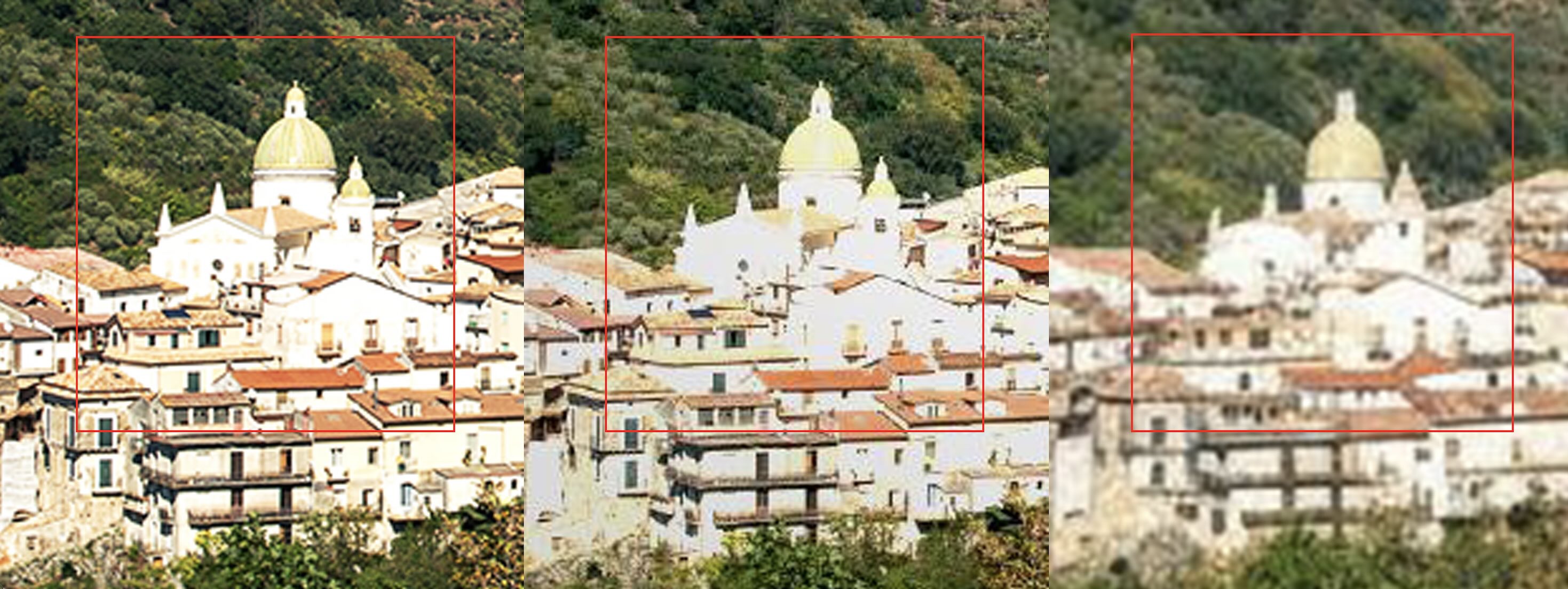
ChatGPT, Nano Banana, and other AI image generators are getting really good at editing photos. The problem is that, right now, there’s a massive gap between the quality of the images digital cameras take and the quality of images that AI image generators can edit.
Look at the image above. On the left, you have the original image edited in Photoshop. In the middle, I used ChatGPT. On the right, I used Nano Banana. Look closely, and you can see a huge drop off in the quality of the details.
While I’m increasingly impressed with how well they do at making changes, the fact that they can’t work with high-resolution images—like the ones you shoot with your smartphone—and don’t offer much control of the results keeps them off the list.
Also, the ChatGPT and Photoshop integration is just a weird way to use Photoshop.

The best AI photo editors at a glance
|
Best for |
Standout feature |
Pricing |
|
|---|---|---|---|
|
Adobe Photoshop |
Full-featured photo editing and design |
Advanced AI-powered tools; industry leader |
From $19.99/month |
|
Luminar Neo |
A photo editor truly powered by AI |
Deep integration of AI across the app |
From $129 for a perpetual desktop license |
|
Canva |
A design app with an AI photo editor |
Powerful template-based design with AI extras |
Free for limited access; from $18/month |
|
Pixlr |
Easy-to-use online photo editing |
Separated AI apps for different editing needs |
Free for limited AI use; from $2.49/month |
|
Lensa |
Mobile photo editing |
Excellent handling of portraits and selfies |
Free for limited features; from $2.99/week or $4.99/month |
|
Claid |
Editing product photos |
Includes AI fashion models |
From $15/month |
Best full-featured AI photo editor and design app
Adobe Photoshop (Windows, macOS, iPad, Web)

Adobe Photoshop pros:
-
Some of the best AI-powered tools you can find in any app
-
It’s still Photoshop, with all the power and control that gives you
Adobe Photoshop cons:
Adobe Photoshop has been the industry standard image editing app for more than three decades now, but instead of showing its age like a lot of other 30-something-year-old software, it still feels fresh and cutting edge.
I was going to make the joke that it’s easier to list the photo editing tasks that Photoshop can’t do than the ones it can—until I realized I legitimately could not come up with a list of things it can’t do. In short, Photoshop is the best full-featured image editor around.
And that extends to AI features: take the Remove Tool. While Photoshop has always made it possible to remove unwanted objects, people, and artifacts from your images—and features like the Patch Tool and Spot Removal Tool have done their best to blend in with your image—the Remove Tool takes it to another level. Of all the apps I tested, this one was by far the best at removing something from an image and replacing it with generated content that blended in. There’s also a text-to-image generator called Generative Fill that allows you to add or replace specific elements using Adobe’s Firefly AI model or partner models from Flux and Google. While it’s not quite good enough to add foreground elements, I’ve found it’s really good at replacing backgrounds.
You can see both of these things in action in the screenshot above. The original image is in the center. I was able to replace Gunther with grass that matches the rest of the image—including the depth of field blur—just by painting over him once. I was also able to replace the background with a different forest—again, matching the depth of field—just by selecting it and typing “a dark forest.” I even got three variations to choose from.
Photoshop has plenty of other AI-powered tools, too. Generative Expand uses Firefly to extend your images with AI-generated content. There are also Neural Filters that can do things like intelligently adjust your subject’s facial expression, transfer the color palette from one image to another, and remove compression artifacts. The automatic subject and background selection is excellent, and the automatic tone, color, and contrast adjustment all work as you’d expect.
Best of all, Photoshop is still the fully-featured app it’s always been. For most AI features, you get plenty of control, and you can always manually edit them and integrate them into your image. If the AI messes up, you have all the tools you need to fix it—even if it takes you a bit longer. Your skill with Photoshop is still a big limit as to how good your results can be.
Unfortunately, Adobe’s credit system is pretty complicated. Essentially, most plans get limited access to generative features like Generative Expand and Generative Fill. If you hit the limits and want to use more AI features, you need to subscribe to a Firefly plan.
Adobe Photoshop pricing: From $19.99/month as part of the Photography Plan, including Adobe Photoshop Lightroom and 1,000 generative credits. Firefly Standard is an additional $9.99/month with 2,000 monthly generative credits.
Adobe is rapidly developing AI features in other apps too:
-
Adobe Photoshop Lightroom is another great image editor in its own right, but it just doesn’t have the same deep AI feature set as Photoshop. The AI photo culling is in beta, and I was a bit disappointed with it. It’s still definitely worth checking out if you just want to edit photos.
-
Adobe Express is a web and mobile image editor and Canva competitor. It has a chatbot-style AI editor in beta, but I ran into too many issues testing it. I suspect it will be good enough to make it onto the list next year.
Best AI photo editor for being truly AI-powered
Luminar Neo (Windows, macOS, Android, iOS)

Luminar Neo pros:
-
AI is legitimately integral to the whole app
-
Designed for photographers, so you get a lot of control over how strongly any effects are applied
Luminar Neo cons:
Luminar Neo was one of the first photo-editing apps to go all in on AI. And of all the apps on this list, it has the deepest AI integration across the whole app. Of course there are the headline features, like the AI-powered enhance (which automatically adjusts tone, contrast, and color), the AI sky replacement (which really works, especially with blown-out or boring gray skies), GenErase (which intelligently removes objects and distractions from your images), and GenExpand (which allows you extend your image as you crop it).
But then there are all the smaller touches. Luminar Neo automatically detects the subject of your image and suggests appropriate presets as a starting point. The AI crop generally does a good job of cutting out extraneous elements without going too close to your subject. And features like the AI face and skin adjustments focus in on the relevant areas of the image, and quickly allow you to do things like brighten your subject’s eyes to draw more attention to them or tone down shiny skin.
Luminar Neo is almost exclusively an app for photographers, or people who really, really care about taking high-quality selfies. As a result, you get a huge amount of control over how the various effects are applied. There isn’t really any one-click magic here: for every tool, you get a slider, so you can control how strongly any edits are made to be sure your photos look how you want. It makes for a great, balanced workflow: the AI lets you work quickly, without pushing things too far.
Luminar also has a mobile app. It’s a stripped-down version of the full app, and it’s included as part of the deal. (It’s harder to justify as a subscription through the App Store and Play Store, though.)
Strangely, Luminar Neo is the only app on this list that couldn’t exist without its AI features. They’re so integral to the whole experience. While you can make simple edits, and often will to make final tweaks, it’s almost impossible to edit a photo without heavily relying on the AI at some point.
The most annoying thing about Luminar Neo is that its pricing is incredibly confusing. It used to be a subscription, and now it’s a perpetual license with a year of updates, though I managed to accidentally sign up for a subscription that’s only available to old license holders and had to contact support to get it sorted out. I’ve also never seen it not on sale. The mobile app has different pricing, though it’s also included in a deal with the desktop app. Luminar Neo is well worth using, but I’d suggest doing a little digging to check what the pricing plan is when you sign up.
Luminar Neo pricing: From $129 for a Perpetual Desktop License or $159 for an All Platforms, cross-device perpetual License; Luminar Neo is also available through Setapp from $5.69/month, but it doesn’t have all the same features, including GenErase.
Photo AI from Topaz Labs is a good alternative to Luminar Neo. It’s a similar product for photographers, but it’s just too niche for most people. It’s worth checking out if you only want to sharpen, remove noise from, or upscale your images using AI. Retouch4me and Aperty (by the same developers as Luminar Neo) are both aimed at portrait and fashion photographers. While powerful, I think they’re too niche for most photographers.
Best design app with an AI photo editor
Canva (Web, iOS, Android)

Canva pros:
-
Super powerful template-based design with nice AI extras
-
By far the easiest tool to use to create real-world designs like social media posts, CVs, and invitations
Canva cons:
Over the past few years, Canva has introduced a heap of new AI-powered features, making what was already an excellent template-based design app even better. It’s always been perfect for quickly creating everything from invitations to Instagram posts, and the AI features make things even easier.
Here’s a full rundown of Canva’s major AI features, but I’ll give you a few of the highlights from my testing:
-
Canva AI is a chatbot that allows you to enter a written prompt to create a template. I used “a birthday party invite for my dog” to create the invitation above. You can make simple edits directly in the chatbot or open the design in the full Canva editor. You can also ask it for design advice.
-
Magic Media is a text-to-image and text-to-video generative AI that you can use to add whatever you want to your designs.
-
Magic Eraser instantly removes unwanted objects from your images. It’s not quite as reliable as Photoshop’s implementation, but it’s good enough for simple clean-up jobs.
-
Magic Edit uses a generative AI to allow you to replace elements of any image. Want to change a regular cake to a way better chocolate cake? Be my guest.
-
Magic Write is an AI text generator that’s available pretty much everywhere throughout the app.
And there are loads of other AI features built into the various parts of the app, or grouped together under Canva AI. Surprisingly, none of Canva’s AI features ever feel shoehorned in—and it’s still an incredible design app whether you use them or not. But if you want to experiment with AI-powered layout options and generating design elements with written prompts, you can do that too.
And with Zapier’s Canva integration, you can automate your design-related workflows. Do things like automatically creating designs based on form submissions or uploading assets from spreadsheet entries. Learn more about how to automate Canva, or get started with a pre-made workflow.
Canva pricing: Free with limited access to AI tools; from $18/month for Pro with more AI tools and higher usage limits.
Best easy-to-use online AI photo editor
Pixlr (Web, iOS, Android)

Pixlr pros:
Pixlr cons:
There are a handful of freemium photo editing and design web apps out there that all have broadly similar features. Based on my testing, Pixlr has the best AI offerings. And even without them, it’s a handy, easy-to-use, and reliable image editor worth checking out.
The majority of the AI features are in the Pixlr X app. And you know what? It really works. In the screenshot above, I used the AI Cutout feature to remove the original background and the generative Backdrop feature to create a new, vibrant one. It’s also got a solid face swap, object removal, and generative fill tools, as well as a separate AI image generator.
Then there are Pixlr’s other tools. There’s the design-focused Pixlr Designer, the Photoshop-like Pixlr E, the AI-powered Remove bg, and the bulk editing Batch Editor. You can swap between them as you need, and they’re all useful in their own way.
Pixlr has even added a Nano Banana-powered conversational editor. Results are mixed for all the reasons I’ve discussed, but if you want to try it out or use it for a few quick edits, it’s there.
But the biggest thing Pixlr has going for it is the price. It’s one of the cheapest AI photo editor apps out there, and you can use a limited version of most AI features on the free plan.
Pixlr pricing: Free for limited AI use and 3 image saves per day; from $2.49/month for Plus, with 80 monthly AI credits, unlimited saves, and no ads.
Pixlr is just one of a number of very similar apps. I preferred its AI features and price, but Fotor, Photoroom, and BeFunky are all equally competent and often had a nicer UI, so they could be solid Pixlr alternatives.
Best mobile AI photo editor
Lensa (iOS, Android)

Lensa pros:
Lensa cons:
Lensa is probably best known for its Magic Avatar feature, which trains a generative image model on a series of your selfies to generate a collection of wacky AI portraits. That part of it works exactly as described, though I’m not sure it strictly counts as photo editing. Still, the rest of Lensa’s AI features are more than enough to get it on this list as the best mobile photo editor.
Lensa recently launched a full-blown AI editing assistant. While the results can be heavy-handed, it takes you through an automated AI-driven editing workflow—you just have to choose the suggested option you like. Sadly, this isn’t included in Lensa’s free offering.
Otherwise, Lensa offers most of the same edits through its Magic AI tool that can automatically identify and tune up portraits with a range of looks from subtle to full-on glam. It works, and the results are far better than they sound, especially if you’re wearing makeup. Lensa also has slightly less AI-driven skin, face, and makeup retouching tools that can help you fine-tune things.
As for other features: the AI-powered Auto Filter was a nice way to navigate the few dozen options. The AI Eraser was better than most other apps I tested, though still far short of Photoshop or Luminar Neo. The Backdrop Cutout and Sky Replacement tools both did really good jobs even with challenging images, and I actually really like the options you could drop in instead.
On top of all that, the regular image editing tools, art styles, effects, and everything else are as good as any I’ve used on a mobile app. It makes Lensa a pretty complete package with an interesting pricing model. On the free plan, you get most features for free—but can only save one image per day. After that, you have to sign up for a paid subscription. If you only use the app occasionally, it’s incredibly generous—otherwise, it’s an expensive mobile subscription that’s only worth it if you really use the AI features.
Lensa pricing: Free to save 1 image per day; from $2.99/week, $4.99/month, or $35.99/year
Best AI photo editor for editing product photos
Claid (Web)

Claid AI pros:
-
Does a great job with product photos, even if you upload bad images
-
AI fashion models are great for clothing brands
Claid AI cons:
Claid is an AI product photo powerhouse. It’s designed to make editing product photos really easy. It has AI-powered tools to remove backgrounds, generate new backgrounds, automatically enhance your images, correct color and lighting, add shadows, and more. There are even AI fashion models you can use. It’s not quite a one-stop shop, and the web app can be a bit weird at times, but it’s a super useful tool for creating better looking product listings and marketing materials.
The better the image you give Claid, the better the results you’ll get, but I was still surprised by how well it handled terrible photos I shot on my iPhone. If you look at the screenshot above, you can see Claid has extracted the hat details from the small photo and done a really great job of putting it on the model.
For small businesses that don’t have the budget for studio shoots, Claid can go a long way toward putting together great marketing materials. It’s not a total replacement for product photography, but it’s a great supplement to it—especially if you have a decent camera and light setup in your home or office.
Claid also integrates with Zapier so you can do things like automatically remove the background from new product photos added to Dropbox or automatically improve your Shopify images—no manual work required. Get started with a pre-made workflow, or build your own automated AI photo editing workflow from scratch.
Claid AI pricing: From $15/month for Essentials plan with 500 credits per month.
Claid AI isn’t the only app that does AI product photography, but it was my favorite. Phot.AI, PhotoRoom, and Slazzer are similar apps that are worth considering.
Expect AI photo editors to keep changing
AI photo editors and image generators are inextricably linked. Things like Photoshop’s Generative Fill and Remove Tool, Canva’s ability to create templates from a prompt, and Claid AI’s product tools are so useful because they combine AI with real images. As AI art generators continue to be able to work with real images without reducing the quality and resolution by so much, the lines between the two categories will continue to blur.
AI editing chatbots are also coming along. Canva and Lensa both use them to good effect, though I’m excited to see how Adobe Express develops.
Related reading:
Our best apps are selected by app testers who personally retest apps every year. This article was originally published in June 2023 and was last updated by an app tester in February 2026. Because these tools change frequently, we also review it for accuracy on a regular basis. It was last reviewed in September 2026.








Leave a Reply